Golden Hour and Blue Hour
You already know. Golden hour is the warm, low-angle light just before sunset. Blue hour is the cool, diffused light just after the sun dips below the horizon. They're the two best windows for natural light photography, and combined they last about an hour.
The problem is that they move. Every day. Sunset in New York shifts from 4:28 PM in December to 8:31 PM in June — a four-hour swing across the year. Set a fixed alarm for "golden hour" and within two weeks it's wrong by 15 minutes. Within a month, you're missing the light entirely.
The Problem with Fixed Alarms
You can look up tomorrow's sunset, subtract 30 minutes, and set a manual alarm. Photographers do this all the time. But it's daily friction — you have to remember to check, remember to adjust, and do it again tomorrow. And the day after. And every day of every shoot.
Some weather apps show sunset times, but they don't have alarms. Some alarm apps have alarms, but they don't track sunset. You end up checking one app and setting another. That's solvable.
How Risetime Solves This
Risetime lets you set an alarm relative to a celestial event — including sunset. Tell it "30 minutes before sunset" and it calculates the exact alarm time for today, tomorrow, and every day after. As sunset shifts through the seasons, your alarm shifts with it. You set it once.
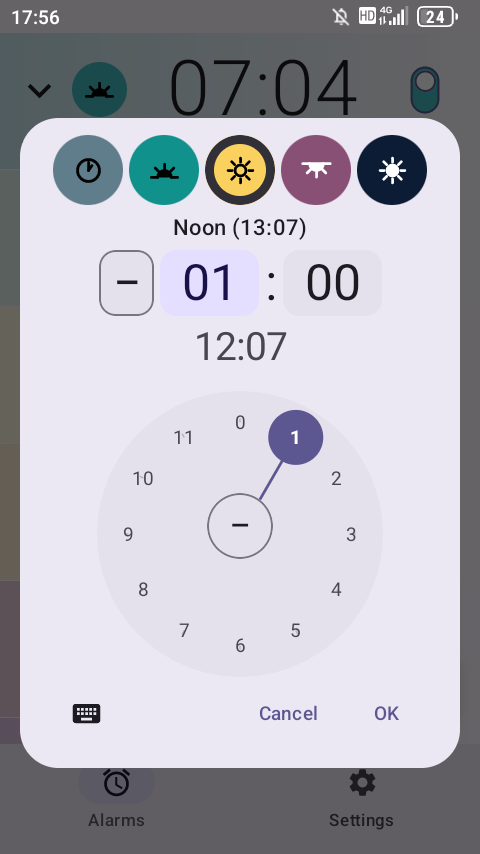
Here's what a photographer's setup might look like:
| Alarm | Setting | Purpose |
|---|---|---|
| Golden hour start | 60 min before sunset | Pack gear, head to location |
| Golden hour peak | 30 min before sunset | Start shooting |
| Blue hour | 15 min after sunset | Switch to blue hour settings |
| Sunrise scout | 45 min before sunrise | Tomorrow morning's first light |
All four alarms recalculate independently every day. Set them once. They stay accurate all year — through equinoxes, solstices, and daylight saving changes.
The Offline Advantage
Photographers shoot where the light is, and the light is often where the signal isn't. Ridgelines, desert flats, coastal bluffs, deep forest — the best locations tend to have the worst cell coverage.
Most sunset time lookups require an internet connection. Risetime doesn't. It calculates sunrise and sunset times using an embedded astronomical engine that runs entirely on your phone. No API calls, no server lookups, no internet connection needed. The app doesn't even have internet permission — it can't connect, by design.
Risetime works anywhere your phone goes. No signal required. Set your golden hour alarm in the city and it still fires on a mountaintop three days later.
This matters for multi-day shoots especially. You don't need to look up sunset times for each day of a trip. Your alarms are already calculated, already scheduled, already tracking the real sky. You focus on the composition. Risetime handles the clock.
Setting Up Your Golden Hour Alarm
The full setup takes about two minutes:
- Open Risetime and set your location in Settings
- Create a new alarm and choose Sunset as your anchor
- Set the offset — 30 minutes before for golden hour, 15 minutes after for blue hour
- Pick your repeat days and enable the alarm
That's the entire process. For a detailed walkthrough with all the options, see the full setup guide.
You can set multiple sunset-relative alarms — a prep alarm, a shooting alarm, and a blue hour alarm — and they all track independently. Mix in a sunrise alarm for dawn shoots and you've got every natural-light window covered.